AI Agents for Business in 2026: How to Automate Your Workflows and Save 20+ Hours Every Week
A comprehensive guide to AI agents for business in 2026 — covering what AI agents are, how they differ from chatbots, the 8 highest-ROI workflows to automate, how to choose the right platform, a 30-day implementation framework, and the honest limitations every business should understand before deploying.

You are probably already using AI. You have ChatGPT open in one tab, maybe Claude in another. You use it to draft emails faster, summarize documents, generate ideas. It saves you twenty minutes here, thirty minutes there.
That is not what this guide is about.
What this guide is about is the shift happening right now in July 2026 that is separating businesses that use AI from businesses that run on AI. The difference is not which tool you use. The difference is whether AI in your business responds to prompts or actually operates your workflows.
That shift has a name: AI agents.
And the businesses that understand it — and implement it — are running leaner, closing faster, supporting more customers, and compounding their output in ways that manual and even basic AI-assisted operations simply cannot match.
McKinsey estimates AI agents could contribute $4.4 trillion in productivity growth across business use cases globally, with at least 15% of day-to-day business decisions made autonomously through agentic AI by the end of 2026. Gartner projects that 40% of enterprise applications will feature task-specific AI agents by year-end — up from less than 5% just twelve months ago.
This is not a future trend. It is happening now, in businesses of every size, across every industry. And this guide gives you everything you need to understand it, evaluate it, and start implementing it in your own operation.
What Is an AI Agent — And How Is It Different From a Chatbot?
This distinction matters more than most people realize, because a significant amount of what is currently being marketed as "AI agents" is actually chatbots with better branding. Understanding the real difference is the foundation for making smart deployment decisions.
A chatbot answers questions. You ask, it responds, the interaction ends. It is reactive and single-step. It has no memory of the last conversation, takes no independent action, and touches nothing in your business systems beyond the conversation window itself.
A traditional automation tool — like a basic Zapier flow or a rule-based workflow — follows a fixed script. When this happens, do that. Useful for predictable, linear processes. Completely rigid when conditions vary or when the next action depends on the output of the previous one.
An AI agent is fundamentally different from both. Give an AI agent a goal — not a prompt, a goal — and a set of tools, and it figures out the steps itself. It can access your inbox, your CRM, your calendar, your database, your project management system. It reasons about what action is required, executes it, evaluates the outcome, and determines the next step. All without a human touching the process between start and finish.
A real-world example: a sales team uses an AI agent that monitors LinkedIn for prospects matching their ideal customer profile. The agent automatically enriches each prospect's contact data from multiple sources, scores the lead against defined criteria, adds qualified leads to the CRM with all relevant context attached, and sends a personalized initial outreach message — all without a sales rep logging in or clicking anything. The agent just runs.
That is the operational shift. Not AI as a tool you use. AI as a system that operates.
Why 2026 Is the Inflection Point for AI Agents
The concept of AI agents is not new. Researchers have been working on autonomous AI systems for years. What changed in 2025 and accelerated dramatically into 2026 is that AI agents became reliable, affordable, and accessible enough to deploy in real business operations without enterprise-level technical infrastructure.
Three converging factors drove this shift:
Model capability reached a production threshold. The models powering AI agents — GPT-4o, Claude Sonnet, Gemini 1.5 Pro and their successors — became capable enough to handle the ambiguity, edge cases, and real-world variation that production business workflows expose them to. Earlier models were too brittle for autonomous operation. The current generation is not.
Tool connectivity became standardized. The emergence of frameworks like the Model Context Protocol (MCP) created a standardized way for AI agents to connect to business tools — CRMs, email systems, databases, project management platforms, communication tools — without custom integration development for every connection. An agent that can access all of your tools through a standard interface can orchestrate workflows across your entire stack.
No-code agent platforms democratized deployment. Platforms like Make (formerly Integromat), n8n, Zapier Agents, and purpose-built agent builders made it possible for non-technical business owners and operators to build and deploy AI agents without writing a line of code. The technical barrier that previously required a development team to cross has been largely removed.
In June 2026, Cloudflare CEO Matthew Prince revealed that agentic traffic — bot, crawler, and agent traffic — had surpassed 50% of all internet traffic for the first time in the history of the web. AI agents are not an emerging phenomenon. They are already the majority of how the internet is being used, and the business implications of that shift are still being absorbed.
According to McKinsey's research on AI and business productivity, businesses that integrate AI into their core operational workflows — rather than using it as a supplementary tool — report productivity improvements of 30 to 50% in targeted process areas, with the most significant gains concentrated in knowledge work, customer interaction, and data-intensive decision-making.
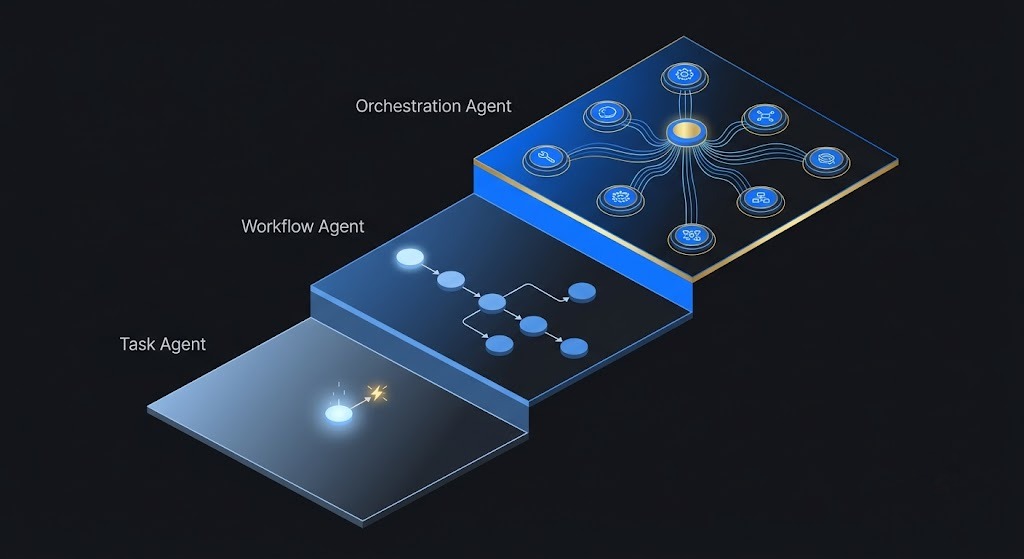
The Three Types of AI Agents Your Business Can Deploy Right Now
Not all AI agents work the same way or serve the same purposes. Understanding the categories helps match the right type of agent to the right business problem.
Type 1 — Task Agents
Task agents handle a single, well-defined category of work autonomously. A customer support task agent monitors incoming support tickets, categorizes each one, retrieves relevant information from your knowledge base and CRM, drafts a response, and either sends it automatically for routine queries or routes it to a human agent with full context attached for complex cases.
A content task agent monitors your content calendar, researches assigned topics, drafts articles or social posts to a specified format, and delivers them to a review queue for human approval before publishing.
Task agents are the right starting point for most businesses. They address high-volume, repetitive work within a defined domain — producing immediate, measurable time savings without requiring complex multi-system orchestration.
Type 2 — Workflow Agents
Workflow agents handle multi-step processes that span multiple systems and require conditional logic at each stage. An AI lead qualification and nurture workflow might: receive an inbound lead form submission, immediately research the prospect across LinkedIn, their company website, and your CRM history, score the lead against your ideal customer profile criteria, automatically route high-score leads to a sales rep with a personalized briefing document, enroll medium-score leads in an automated nurture sequence, and disqualify low-score leads while logging the reason.
This entire workflow — which might have previously required three to four people manually touching the process at different stages — runs automatically from form submission to outcome, with a human only entering the process at the decision points that genuinely require human judgment.
Workflow agents are where the operational leverage of AI agents becomes most dramatically visible, because they eliminate not just individual tasks but entire coordination layers between tasks.
Type 3 — Orchestration Agents
Orchestration agents coordinate a team of specialized sub-agents to complete complex, enterprise-scale workflows. One sub-agent qualifies a new lead. A second books the discovery call based on the rep's live calendar availability. A third updates the CRM with all context from both previous steps. A fourth triggers the appropriate post-call follow-up sequence based on the call's outcome.
No human touches the process between the initial lead capture and the follow-up email. The orchestration agent manages the handoffs, the data flow, and the conditional logic between specialized agents — each of which has a narrow, well-defined role within the larger process.
Orchestration agents represent the frontier of what is currently deployable, and they are most appropriate for businesses that have already implemented and refined task and workflow agents for specific processes.
The 8 Business Workflows AI Agents Are Automating Right Now
1. Customer Support and Service Resolution
Customer support is the most commonly automated workflow in 2026, and the results are the most well-documented. AI agents in customer service are projected to autonomously resolve 80% of common customer service issues by 2029, and early implementations are already delivering resolution rates of 70 to 85% for routine query types.
The workflow: incoming queries arrive via live chat, email, or messaging platform. The agent reads the query, identifies the intent, retrieves relevant account data from the CRM, pulls the appropriate information from the knowledge base, and generates a specific, accurate response. Routine queries are resolved without human involvement. Complex queries are routed to human agents with full context — query history, account data, relevant knowledge base articles — pre-attached, reducing average handle time for the escalated cases as well.
In customer service alone, AI agents have driven productivity gains of 15 to 30% across implementations, with some firms reporting 80% improvement targets being achieved ahead of schedule.
2. Lead Generation and Sales Qualification
The sales qualification workflow is one of the highest-ROI AI agent implementations for most businesses, because the cost of a sales rep spending time on unqualified prospects is both measurable and significant.
AI agents monitor defined lead sources — form submissions, LinkedIn connections, webinar registrations, content downloads — research each prospect automatically, score them against the ideal customer profile, and route qualified leads to the appropriate rep with a briefing document that includes company research, LinkedIn profile highlights, CRM history, and a suggested opening angle.
91% of SMBs using AI report a direct increase in revenue specifically attributed to faster lead response times — one of the most cited statistics in the AI agent ROI literature, and one that reflects a straightforward mechanism: leads that receive a relevant response faster convert at higher rates.
3. Content Creation and Distribution
Content workflows involve high volumes of repetitive tasks — research, drafting, formatting, scheduling, cross-platform adaptation, performance monitoring — that AI agents handle efficiently without the creative judgment gaps that make pure automation unsuitable for original content strategy.
A content workflow agent might: monitor a defined list of industry news sources and flag relevant developments, draft initial social media posts or newsletter paragraphs on flagged topics, deliver drafts to a content review queue for human approval, schedule approved content for publication across connected platforms, and aggregate performance data from each platform into a weekly summary report.
The human role in this workflow is not eliminated — it is concentrated. Instead of a content team spending 40% of their time on research and formatting, they spend that time on creative decisions, editorial judgment, and strategy. The agent handles the rest.
4. E-Commerce Order Management and Customer Communication
For e-commerce businesses, order-related customer queries are the single highest-volume support category — and the most automatable. An AI agent connected to the e-commerce platform, shipping system, and customer communication tools can: monitor orders for delay signals, proactively notify customers about delays before they contact support, respond to order status queries with real-time accurate information, process return requests against defined policy rules, and escalate edge cases to human agents with full order context attached.
This workflow not only reduces support volume — it improves customer experience metrics, because proactive communication about delays consistently generates better satisfaction scores than reactive support for customers who have already waited and reached out.
5. Financial Data Processing and Reporting
Finance teams spend a disproportionate share of their time on data gathering, reconciliation, and report formatting — work that is high-volume, repetitive, and directly suitable for AI agent automation.
AI agents in finance workflows can: pull financial data from connected accounting systems, reconcile transactions against defined rules, flag anomalies for human review, populate standardized report templates with current data, and distribute reports to defined recipient lists on a scheduled basis.
The time savings in financial reporting workflows are among the most dramatic of any AI agent implementation — with teams reporting reductions in monthly reporting preparation time from days or weeks to hours, directly freeing senior finance professionals for the analytical and strategic work that actually requires their expertise.
6. HR and Recruitment Screening
Recruiting workflows involve significant volumes of standardized, repetitive tasks that AI agents handle well — and a smaller number of high-judgment decisions that benefit from human expertise.
An AI recruiting workflow agent might: monitor job applications as they arrive, screen resumes against defined role criteria, send acknowledgment communications to all applicants, schedule assessments or screening calls for qualified candidates, update the ATS with each stage of progress, and generate summary briefing documents for hiring managers before interviews.
The result is not automated hiring — human judgment remains central to the decisions that matter. The result is human hiring professionals spending their time on assessment and decision-making rather than administrative coordination.
7. Social Media Monitoring and Response
For brands managing social media presence across multiple platforms, the monitoring and initial response workflow is a high-volume, time-sensitive process that AI agents execute consistently without the bandwidth constraints that affect human social media teams.
An AI social media agent can: monitor brand mentions across connected platforms in real time, classify mentions by sentiment and urgency, draft appropriate responses for routine interactions, flag high-priority or sensitive mentions for immediate human review, and generate performance summary reports across channels on a defined schedule.
8. Project Management and Internal Coordination
Internal coordination workflows — status updates, meeting summaries, task creation from discussion points, progress tracking, stakeholder communication — consume significant time for project managers and team leads without requiring creative or strategic judgment.
AI agents embedded in project management tools can: generate meeting summary documents from transcripts, create and assign tasks from identified action items, send automated status updates to stakeholders based on project progress, flag at-risk timelines based on task completion rates, and compile project status reports for leadership review.
How to Choose the Right AI Agent Platform for Your Business
The platform landscape for AI agents is expanding rapidly, and the right choice depends on your technical resources, the complexity of workflows you need to automate, and your budget.
For non-technical business owners and small teams:
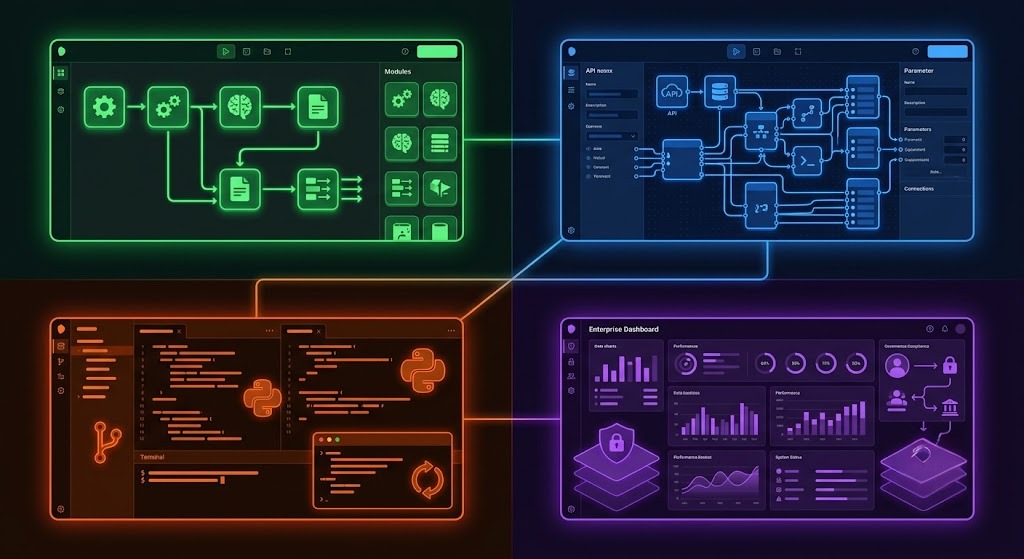
Make (formerly Integromat) and Zapier Agents provide visual, no-code interfaces for building AI agent workflows across 7,000+ connected apps. Both platforms allow workflow construction through drag-and-drop interfaces with AI decision nodes that provide agentic capability within a structured, controllable environment. Make's more advanced flow logic makes it the preferred choice for complex multi-step workflows. Zapier's larger app library and simpler interface make it the more accessible starting point.
For businesses with moderate technical resources:
n8n offers a self-hostable, open-source workflow automation platform with AI agent capabilities. The self-hosting option provides full data control and significantly lower per-execution pricing at higher automation volumes — relevant for businesses processing thousands of automated tasks per month. n8n's community template library also provides starting points for many common business workflow patterns.
For businesses building custom agent applications:
Relevance AI provides a platform for building custom AI agents with tool access, memory, and multi-agent orchestration without requiring deep AI engineering expertise. It sits between no-code visual builders and full custom development — making it appropriate for technical operators who need more flexibility than Zapier or Make provide but do not want to build from scratch.
For enterprise deployments:
Microsoft Copilot Studio, Salesforce Agentforce, and Google's Vertex AI Agent Builder provide enterprise-grade agent infrastructure with native integration into existing enterprise software ecosystems. These platforms include the governance, audit trail, and security capabilities that enterprise compliance requirements demand.
According to Gartner's research on enterprise AI adoption, the businesses achieving the strongest ROI from AI agent deployment in 2026 are those that started with a single, well-defined workflow rather than attempting enterprise-wide AI transformation from day one. The pattern consistently cited: identify the workflow, pilot the agent, measure the outcome, refine, then expand.
The Step-by-Step Framework for Implementing Your First AI Agent
The most common reason AI agent implementation projects fail is not technical. It is strategic. Businesses attempt to automate complex, high-variation workflows before establishing the infrastructure and confidence to run simpler, well-defined ones. The result is brittle automations that break on edge cases, require constant maintenance, and create distrust of AI agents among the team members who have to deal with the failures.
The framework that consistently produces successful first implementations follows a specific sequence.
Step 1 — Identify the right first workflow
Choose a workflow where three conditions are true simultaneously: the manual effort is measurable and significant (a minimum of 3 to 5 hours per week), the process steps are defined and consistent enough to document, and the cost of an individual error is low enough that occasional mistakes do not create serious business consequences while the agent is being refined.
Customer email triage, lead data enrichment, weekly report compilation, and social media monitoring all typically satisfy all three conditions. Complex negotiation, sensitive customer escalations, and creative strategy decisions do not.
Step 2 — Document the current workflow in detail
Before building anything, document how the workflow currently runs: every step, every decision point, every tool involved, every exception that occurs. This documentation becomes the specification for the agent. AI agents built without clear workflow documentation consistently require significantly more iteration than those built from a well-specified process map.
Step 3 — Define success metrics and monitoring
Establish the specific metrics you will track to evaluate whether the agent is performing correctly: number of tasks completed per day, error rate per hundred executions, human escalation rate, time saved per week. Set up logging and monitoring before the agent goes live, not after.
Step 4 — Build with approval gates for the first 30 days
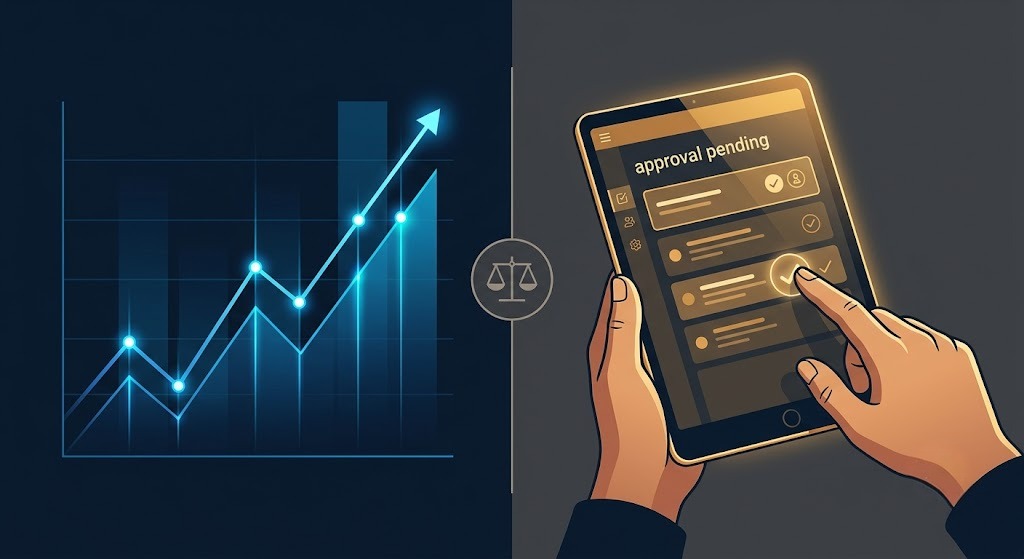
The most reliable approach for first implementations is a draft-and-approve structure where the agent generates the output — draft email, updated CRM record, formatted report — and a human reviews and approves before it is sent or published. This hybrid structure provides the time savings of automation while maintaining human oversight during the period when the agent is being calibrated against your specific business context.
Transition to fully autonomous operation only after the agent's outputs have been consistently accurate across a meaningful volume of real cases.
Step 5 — Measure, refine, and expand
At 30 days, review the performance data against your success metrics. Identify the error patterns. Refine the agent's instructions, tool access, or decision logic to address them. Once the first workflow is operating reliably, use the documented implementation process as a template for the next workflow.
The businesses achieving the most significant AI agent ROI in 2026 are running 5 to 15 automated workflows simultaneously — not because they implemented them all at once, but because they followed this sequential build-and-validate process consistently over 12 to 24 months.
Real Business Outcomes: What the Data Shows
The ROI evidence for AI agent implementation in properly scoped workflows is compelling and increasingly well-documented.
In customer service, businesses implementing AI agents for first-line support resolution report 15 to 30% productivity improvements with some implementations reaching 80% autonomous resolution rates. Customer satisfaction scores improve because response times decrease and consistency improves — both outcomes of autonomous operation rather than human variability.
In sales development, 91% of SMBs using AI for lead qualification and outreach report direct revenue increases attributed to faster, more consistent lead response. The mechanism is straightforward: faster qualified responses convert at higher rates, and AI agents never have off days, never deprioritize follow-up tasks, and never forget to send the third-touch email.
In content and marketing operations, teams implementing AI content workflow agents report reclaiming 40 to 60% of the time previously spent on research, formatting, scheduling, and reporting — time redistributed to strategy, creative direction, and higher-value analysis.
In finance and operations, the consolidation reporting time reductions are among the most dramatic across any workflow category — with teams consistently reporting reductions from 3-week manual processes to 2 to 4-hour automated ones for monthly reporting cycles.
The Vendasta research on AI adoption for small businesses found that businesses using AI agents for workflow automation reported 3x faster response times to customer inquiries and significantly higher team productivity scores compared to businesses relying on manual workflows — with the productivity gap widening as the AI agent implementations matured.
The Honest Limitations of AI Agents in 2026
Any responsible guide to AI agents for business has to address where the technology currently fails — not to discourage implementation, but to prevent the expectation gaps that cause implementations to be abandoned prematurely.
AI agents require clear workflow specification. The most common implementation failure is building an agent for a workflow that is not actually well-defined. If a human performing the workflow has to make significant judgment calls based on tacit knowledge, contextual intuition, or relationship-specific understanding, the agent will expose those gaps through errors. The solution is not better AI — it is better workflow specification before deployment.
AI agents make mistakes, and the mistakes compound. An agent executing 200 tasks per day at a 99% accuracy rate still makes 2 errors per day. At 1,000 tasks per day, that is 10 errors. In workflows where errors have significant consequences — financial transactions, legal communications, irreversible commitments — the accuracy threshold required before removing human approval gates is much higher than in low-stakes workflows.
Data quality determines output quality. An AI agent accessing a CRM with inconsistent, incomplete, or outdated records will produce outputs that reflect those data quality problems. Implementing AI agents without addressing underlying data quality issues amplifies existing data problems rather than solving them.
Tool connectivity has limits. Some legacy business systems do not support API access, webhook integration, or the standard connectivity that AI agent platforms require. Workflows that depend on systems without connectivity options require custom integration development before agents can be built around them.
The fix-then-automate principle matters. The businesses that extract the most value from AI agents follow a consistent principle: fix the process first, then automate the fixed process. Automating a broken or poorly designed workflow produces faster, more consistent bad outcomes — not better outcomes.
Getting Started With AI Agents: The 30-Day Launch Plan
If the strategic and operational case has landed, the question becomes practical: where do you actually start?
Week 1 — Audit and prioritize
List every repetitive workflow in your business that consumes more than 3 hours per week. For each one, score it on three dimensions: volume (how many times per week does this happen?), standardization (how consistent are the inputs and the correct outputs?), and risk (what is the cost of an individual error?). Prioritize workflows that are high-volume, high-standardization, and low-risk. These are your first agent candidates.
Week 2 — Document your top candidate workflow
Choose the highest-priority workflow from your audit and document it in detail. Every step. Every tool. Every decision point and the logic behind each decision. Every exception that occurs and how it is currently handled. This documentation is the specification your agent will be built from.
Week 3 — Build and configure your first agent
Choose the platform appropriate for your technical resources — Zapier Agents or Make for non-technical users, n8n or Relevance AI for more technical operators. Follow your workflow documentation to configure the agent's steps, tool connections, and decision logic. Set up approval gates for the initial deployment period. Test with a small volume of real cases before enabling full automation.
Week 4 — Deploy, monitor, and measure
Enable the agent on your real workflow volume. Monitor performance daily against your defined success metrics. Log every error and categorize it — instruction gap, data quality issue, edge case, or tool failure. Each error category has a different fix. Refine the agent configuration based on the first week's error patterns before expanding volume.
At day 30: evaluate performance data, calculate the time saved, assess the error rate and its business impact, and decide whether to proceed to full autonomous operation or extend the approval gate period. Begin identifying the second workflow for implementation using the same process.
AI Agents and the Future of How Businesses Operate
The shift from AI as a tool you use to AI as infrastructure that runs your business is not a 2030 prediction. It is a 2026 reality for the businesses that have already made the transition.
Gartner projects that by 2028, 90% of B2B buying will be AI agent-intermediated — pushing over $15 trillion of B2B spending through AI systems. The businesses that AI agents are shopping from, recommending, and completing transactions with are the ones that will capture that spending. The ones that do not appear in AI agent consideration sets will find their discovery channels narrowing in ways that are structurally different from anything that happened with search or social.
For business owners, founders, and operators who are still using AI as a prompt-response tool — one interaction at a time, one task at a time — the operational gap between their business and the businesses already running on AI agents is widening every month.
The entry barrier is lower than it has ever been. The learning curve is shorter than it has ever been. The business case is more documented than it has ever been. And the competitive advantage of moving early — before the workflows your competitors are running are also being run by every other business in your category — is still available.
The right time to start was twelve months ago. The second right time is now.
According to Harvard Business Review's research on technology adoption and competitive advantage, the businesses that extract the most sustainable competitive advantage from new technology platforms are consistently those that adopt early enough to develop operational expertise while the learning and implementation landscape is still open — not those that wait for the technology to be fully mainstream before beginning to build capability.
Final Verdict: AI Agents Are Not Optional in 2026
The businesses that run on AI agents in 2026 have a structural operational advantage over businesses that do not. They respond faster, scale without proportional cost increases, maintain consistent quality at volume, and free their human talent for the work that actually requires human judgment. That advantage compounds over time as agent implementations mature and as the operational knowledge of running AI workflows accumulates.
The businesses still relying entirely on human execution for workflows that AI agents can handle are not just inefficient. They are increasingly uncompetitive against organizations that have restructured their operations around what AI can now do.
Start with one workflow. Document it thoroughly. Build the agent with approval gates. Measure the outcome. Refine and expand.
The path from where most businesses are today to a genuinely AI-powered operation is not a single leap. It is a sequence of well-executed steps. The only thing that makes the step sequence difficult is not starting.
Frequently Asked Questions
What is an AI agent for business? An AI agent for business is an autonomous software system that receives a goal and a set of tools — access to your CRM, inbox, database, project management system, or other connected software — and determines and executes the steps required to achieve that goal without human intervention at each stage. Unlike chatbots that respond to single prompts, AI agents handle multi-step workflows from start to finish.
How is an AI agent different from a chatbot? A chatbot is reactive and single-step — it answers questions within a conversation window. An AI agent is proactive and multi-step — it receives a goal, plans the required actions, accesses your business systems, executes each step, evaluates the outcome, and proceeds to the next action, all autonomously.
What business workflows are best suited for AI agents? The highest-ROI initial implementations are customer support triage, lead qualification and enrichment, content distribution workflows, e-commerce order management, financial report generation, and internal project status coordination. These workflows share the characteristics that make AI agent automation most reliable: high volume, consistent process steps, and low per-error risk.
How much does it cost to implement AI agents? No-code platforms like Zapier Agents start at $20 per month. Make's plans start at approximately $9 per month. n8n's cloud plans start at $20 per month, with self-hosted deployment available for free. Purpose-built agent platforms like Relevance AI charge based on agent run volume. Enterprise platforms from Microsoft, Salesforce, and Google have custom pricing based on deployment scale.
How long does it take to see ROI from AI agents? For well-scoped, high-volume initial workflows, measurable time savings are typically visible within the first 2 to 4 weeks of deployment. Full ROI validation — accounting for implementation time and any necessary refinement — is typically achieved within 30 to 60 days for the first workflow, with each subsequent workflow implementation producing faster results as the team's agent-building capability matures.
Are AI agents safe for sensitive business data? Data security depends on the platform and configuration choices made during implementation. Self-hosted platforms like n8n keep data within your own infrastructure. Cloud-based platforms subject data to the provider's security and privacy policies. For workflows involving sensitive customer data, financial information, or proprietary business data, evaluating the security architecture of any agent platform is a mandatory pre-deployment step, not an afterthought.
Can small businesses benefit from AI agents? Yes. The no-code platforms available in 2026 make AI agent implementation accessible to businesses without technical teams. 91% of SMBs using AI agents report direct revenue increases attributed to faster lead response and operational efficiency improvements. The workflows that deliver the highest ROI — customer support, lead qualification, content scheduling — are relevant at every business size.
Founder & Editor, Axionova
Ashir writes independent, hands-on reviews of AI tools and shares strategies for creators, marketers, and entrepreneurs. Every review is grounded in real usage — no paid placements, no fluff. Read our editorial standards.
AI Insights Weekly
One curated email a week: sharp AI insights, tool reviews, and strategies.
Have thoughts on this?
Contact us or share this article on social media — we'd love to hear what resonated with you.